Lighting Consoles
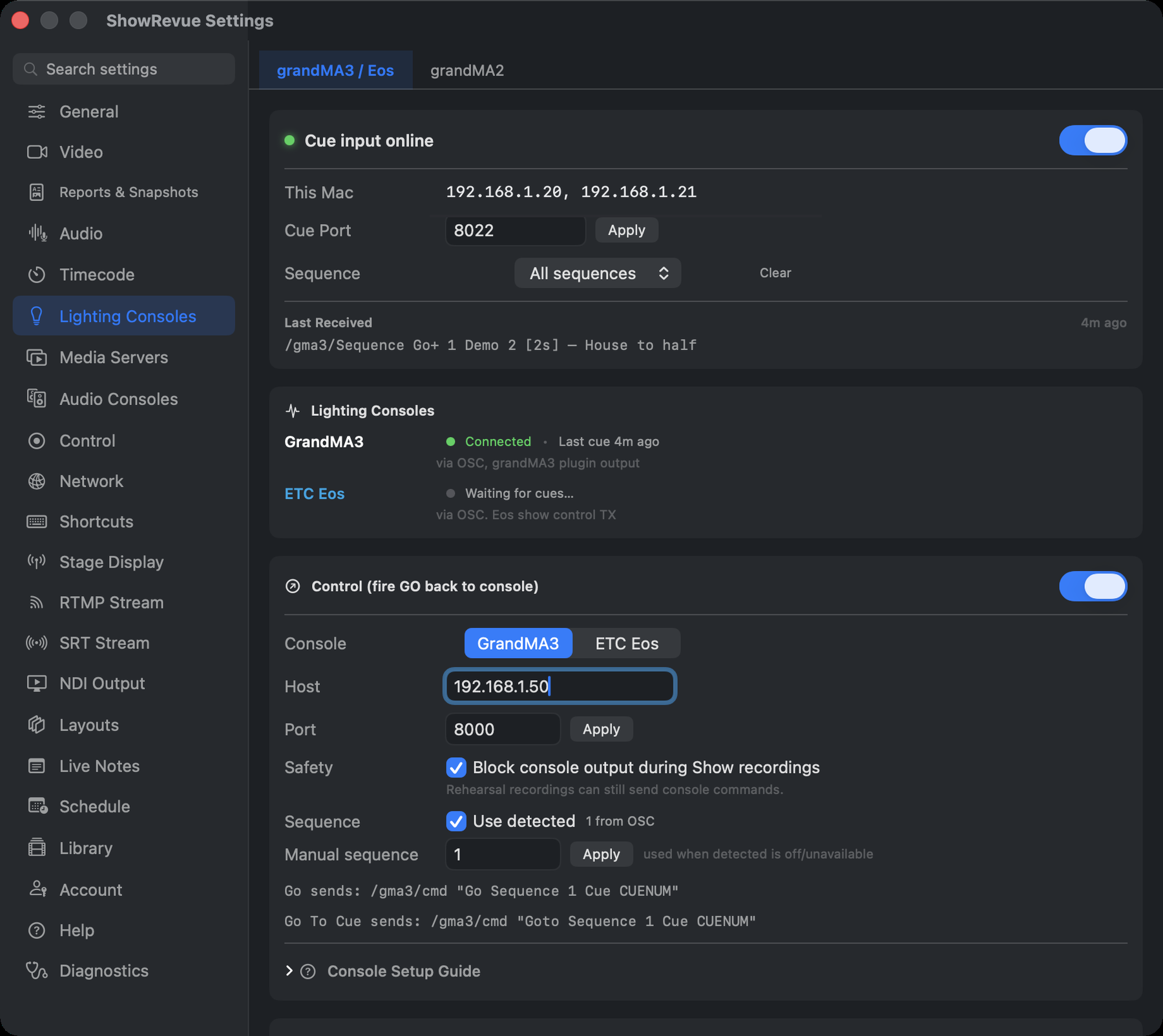
Cue input port, fire-back host/port, and the show-output safety gate.
Cue input (grandMA3 / Eos over OSC, grandMA2 over MSC) needs a Base licence. Firing cues back to the desk needs Professional.
Two sub-tabs: grandMA3 / Eos (OSC) and grandMA2 (MIDI MSC). Console wiring guides live on grandMA3, grandMA2 and ETC Eos.
grandMA3 / Eos
Cue input. The listener. It shows this Mac's IP, the Cue Port (default 8000), and a live
Cue input online / offline status, with Last Received: the last raw OSC message and how long
ago. That's the first place to look when the LX op swears they're sending.
Leave Sequence on All sequences. With it on All, ShowRevue records every list the desk sends, and you choose the one that runs the show in Project Settings → Consoles. Ticking a list there doesn't filter the recording; it picks which list drives act timing, the Director view and cue stepping. Setting this Preferences filter to one grandMA3 sequence is different: cues from every other sequence are then ignored and never reach the recording.
Lighting Consoles shows grandMA3 and ETC Eos side by side; a desk reads Connected only if a cue landed in the last five minutes, otherwise Waiting for cues….
Control: fire GO back to the console
Console OSC output needs a Professional licence.
- Console. grandMA3 or ETC Eos.
- Host and Port. The desk. A Use
<ip>button adopts the IP the cues are arriving from. - Block console output during Show recordings. The safety gate, on by default. Leave it on: while a Show session is recording, nothing ShowRevue does can send a cue to the desk, and anything it would have sent is logged as blocked in the Output Audit Trail. Rehearsal recordings can still send. See Show Safety.
- MA3: Use detected sequence, or a manual sequence number. Eos: Use detected cue list, or a manual list.
The tab prints the exact strings it will send:
grandMA3   /gma3/cmd "Go Sequence 1 Cue 24"
           /gma3/cmd "Goto Sequence 1 Cue 24"
ETC Eos    /eos/cue/1/24/fire
           /eos/newcmd "Go_To_Cue 1 / 24 Enter"
grandMA2
Read-only. There is nothing to configure. ShowRevue connects to all available MIDI sources automatically and listens for MSC GO; the tab shows the source count, the Connected MIDI Sources list, and how long ago the last cue arrived. Any MSC device ID is accepted (including 7F, broadcast), and any command format.
It only listens. ShowRevue never sends anything back to a grandMA2, and Note-On cue triggering isn't supported: only MSC GO is parsed.
The tab's How to connect GrandMA2 steps cover the desk side: Setup → Console → MIDI Show Control, turn on Send MIDI Show Control, mode General or Lighting, Device ID 0 (All). For interfaces, MTC and troubleshooting, see MIDI Setup.