Timecode
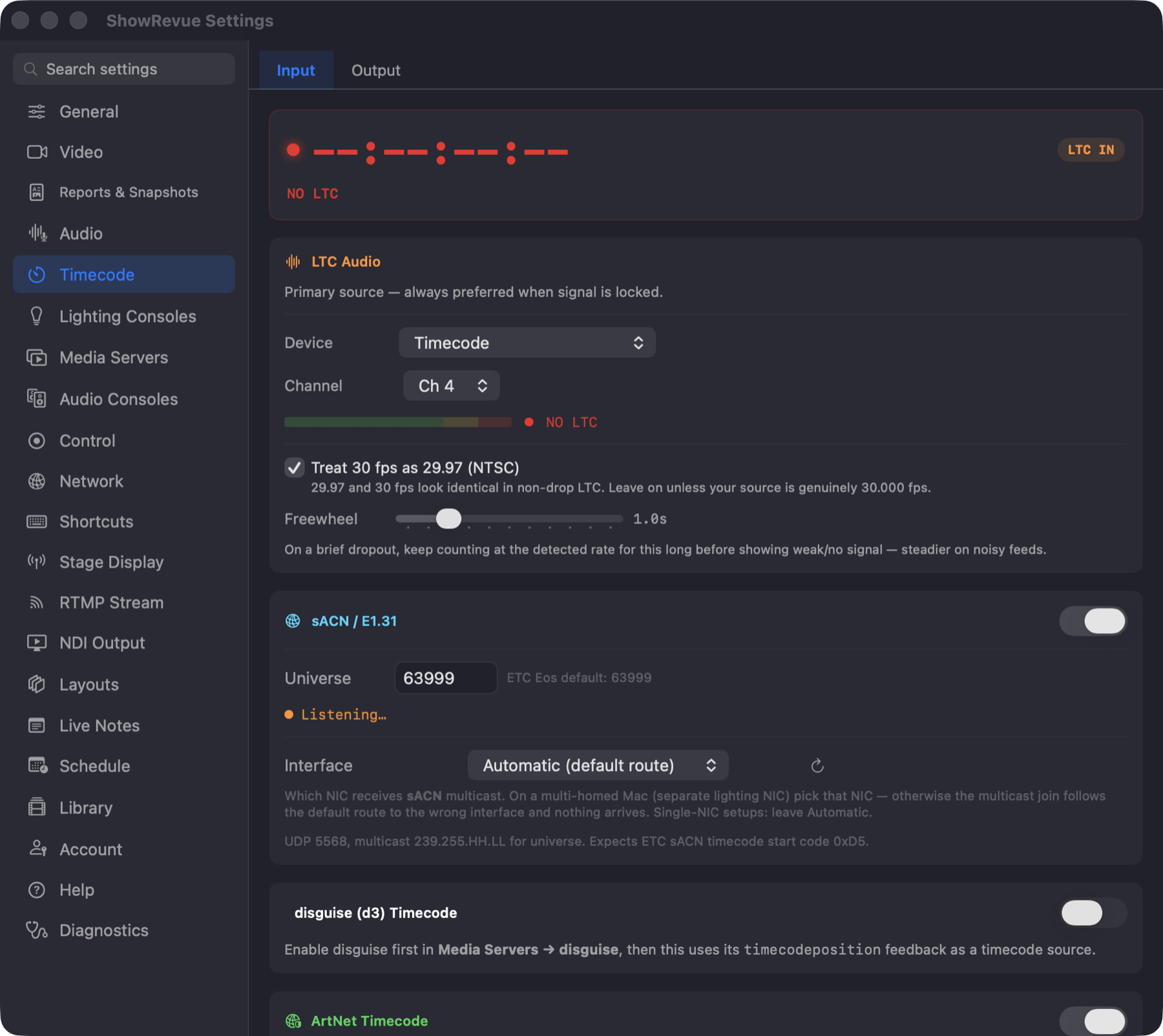
For the whole timecode story (what to feed ShowRevue, how it locks, and how playback follows it) see Timecode. This page is the tab itself.
The tab is split into two sub-tabs: Input (reading timecode while you record) and Output (sending the recording's timecode back out during playback).
At the top of the Input tab: the live timecode, whether it's locked, the detected frame rate, and which source is driving it.
LTC Audio
First in the default Source Priority, and live when the signal is locked. LTC input needs a Base licence.
- Device and Channel. Which input the LTC arrives on. Locked while recording. Choosing them here is what opens the decode stream; you don't need to configure an audio track for LTC.
- Treat 30 fps as 29.97 (NTSC) (on). 29.97 and 30 fps look identical in non-drop LTC. Leave it on unless your source is genuinely 30.000 fps.
- Freewheel (0–5 s), on a brief dropout, keep counting at the detected rate for this long before showing weak/no signal. Steadier on noisy feeds.
If the LTC looks like it's on the wrong channel
ShowRevue listens to the other channels on the same device as well as the one you picked. When one of them carries something that looks far more like LTC than the selected channel does (the flat crest factor and the transition rate a biphase-mark signal has, and nothing else does), it tells you which channel that is.
It doesn't switch for you. A patch changing itself mid-rehearsal is worse than a wrong one you can see. It is a prompt to check the patch, and it is nearly always right: LTC does not sound like anything else on the desk.
Network sources
sACN, Art-Net and MTC input need a Professional licence.
- sACN (ETC timecode). ETC's timecode packet format, not part of standard E1.31, so grandMA3 and most other desks don't send it. Universe (ETC Eos defaults to 63999) and Interface. On a multi-homed Mac
with a separate lighting NIC, pick that NIC: the multicast join otherwise follows the default
route to the wrong interface and nothing arrives. UDP 5568, start code
0xD5. - Art-Net Timecode. UDP 6454, opcode
0x9700. Unicast or broadcast. grandMA3: Timecode → ArtNet; ETC Eos: Settings → Network → ArtNet Timecode. - MIDI Timecode (MTC). Quarter frames from any CoreMIDI source. Network MIDI sessions work with no extra setup. For QLab over the network, interfaces and troubleshooting, see MIDI Setup.
- disguise (d3). Uses disguise's
timecodepositionfeedback. Enable disguise first under Media Servers.
Source Priority
The card at the bottom of the Input tab. ShowRevue follows the highest live source in the list and fails over down it. Each row shows the source's number, its state (for example Receiving, Waiting or Disabled) and up / down arrows to move it. You can also drag a row by its grip and drop it in a new place. The order is saved on this Mac. Dragging and the arrows are both locked while recording.
Default order:
- LTC Audio. Live whenever the decoder is locked
- sACN (ETC timecode)
- ArtNet Timecode
- MIDI Timecode
- disguise Timecode
If no source is live, the readout falls back to LTC. See Source Priority and failover.
Network sources carry a small receive delay (typically under a frame). Fine for display and monitoring; use LTC for recording sync.
Output
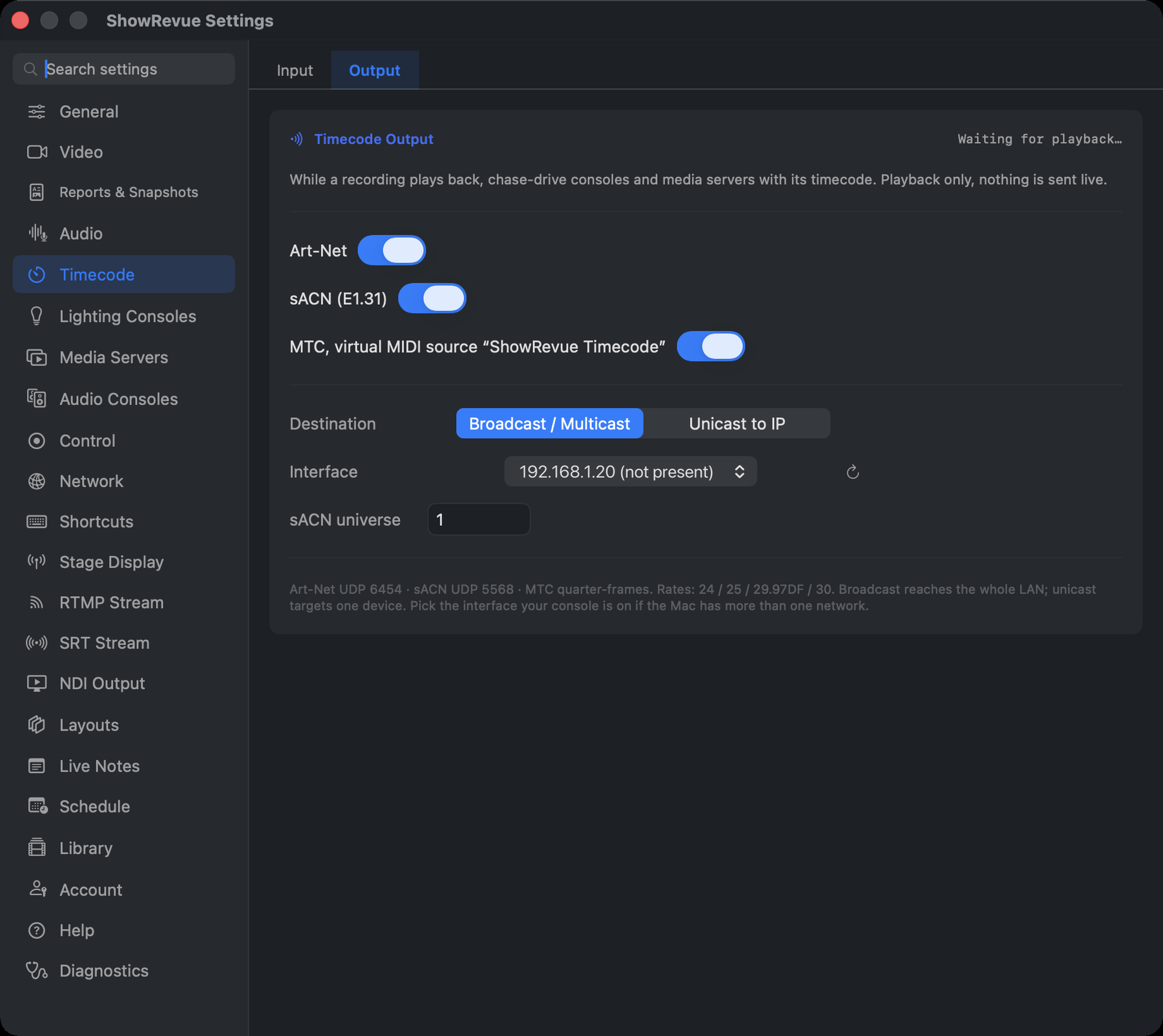
Timecode Output (Art-Net, sACN, MTC) needs a Professional licence, like the network timecode inputs.
LTC goes back out a different way: there's no LTC generator here. The recorded LTC track plays out through whichever audio output you send it to, from the LTC row in the output mixer. LTC out on audio needs a Base licence.
Everything below lives on the Output sub-tab. While a recording plays back, chase-drive consoles and media servers with its timecode. See the Timecode Output guide for the full workflow. Playback only, nothing is sent live. The card header shows a green SENDING dot while emitting, or Waiting for playback… when enabled but idle.
- Art-Net. ArtTimeCode on UDP 6454.
- sACN (ETC timecode). UDP 5568, ETC's timecode packet format.
- MTC, virtual MIDI source "ShowRevue Timecode". Quarter frames; subscribe from any CoreMIDI-capable app or console. Needs no network settings.
With Art-Net or sACN enabled:
- Destination. Broadcast / Multicast reaches the whole LAN; Unicast to IP targets one device (an IP field appears).
- Interface. Which NIC the packets leave on. Automatic (default route) suits a single-network Mac; on a rig with a separate lighting NIC, pick that interface so broadcast and multicast actually reach the console.
- sACN universe. Shown when sACN is on; match the receiver.
Output follows the recording's own rate and drop-frame flag (stored in its sidecar at record time). Supported rates: 24 / 25 / 29.97DF / 30. Anything else pauses output with a note in this card.