Reports
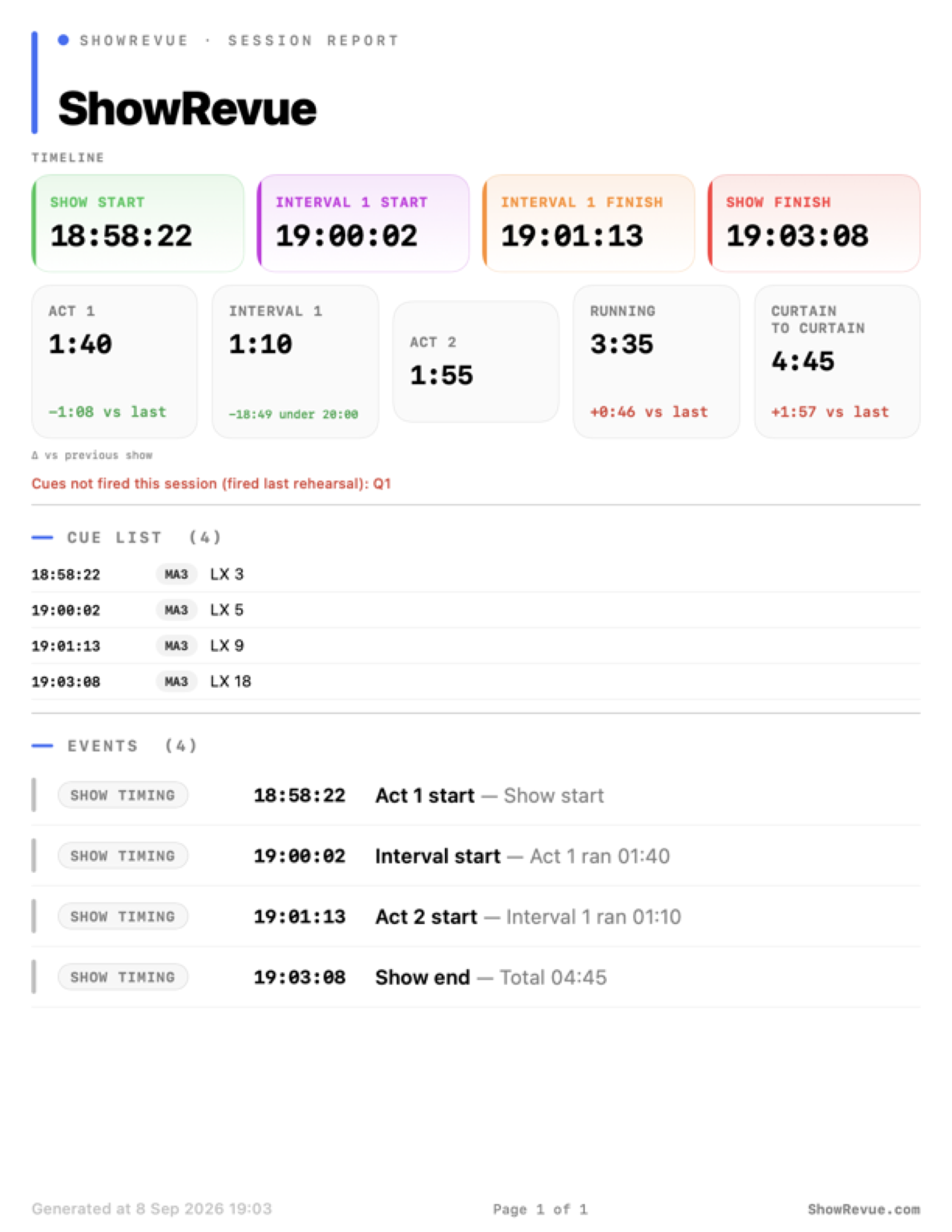
The top of a session report: the show timeline (start / interval / finish) and running times. Act, interval, RUNNING (acts) and curtain-to-curtain (incl. interval), each with the delta vs the previous show. The full report continues with the event log.
📄 Download the full sample report (PDF). A two-act show including the event log (Stage Display calls, a backwards-cue warning).
Session reports and the notes PDF need a Base licence or above. Viewer can't export PDFs. See Licence Tiers.
Session reports
The automatic report is off by default. To turn it on, go to Preferences → Reports & Snapshots → Session Reports, tick Auto-export PDF summary after each recording, and use Save to → Choose… to pick where the reports go. A Reports folder inside the show's folder keeps them with everything else.
When it's on, ShowRevue writes a PDF session report every time a recording stops, including:
- session information,
- full cue list with timestamps,
- act / interval running times with planned-vs-actual variance per interval (see Show State),
- optional cue snapshots and notes.
The timing cues used for act / interval calculations come from File → Project Settings → Timing. They are saved into the recording file itself at record time, so re-exporting the report later stays accurate even after the project is closed.
When no interval was set
After a long dress or show with no intervals set in the project, ShowRevue asks Was there an interval? and suggests the gaps in the cue list that look like one. Tick the ones that were real and click Save to Project, or Not now. They're guesses, so check them. Once saved, the run times work themselves out on later takes.
Cue timing across performances
When a project has earlier takes, the report adds a Cue timing across performances section. It lists lighting cues that landed more than 3 seconds from where they usually land, so a cue that is creeping later each night shows up before anyone notices on the floor.
- Times are measured from the Show Start cue, so a late curtain doesn't make every cue look moved. Only lighting cues are included, and each cue's first fire counts.
- "Usually" is the median over up to 8 earlier takes of the same project. ShowRevue reads them from each take's sidecar, so takes recorded before this feature count too.
- Each row shows the cue, when it landed tonight, the usual time, and how far it moved (for example
+9s later). If the cue has landed later on each of the last two or more runs in a row, the row says so ("later again each of the last 3 runs"). - The section lists up to 15 cues, biggest shift first.
It needs a Show Start cue on tonight's take and at least two earlier takes with that cue and the cue in question. Without them the section is left out. The same cue number on two different cue lists counts as two cues.
Emailing the report
The same section has Email report to the show team when finished (asks first). With it on, stopping a take puts an Email report to team button on the Show complete bar. Nothing is sent until you click it.
Cloud reports: send, draft, review
A cloud show can email a branded report to the whole team when a recording finishes, or hold it back as a draft for someone to check first. One per-show setting, When a recording finishes, decides which. Set it in the app under Project Settings ▸ Cloud ▸ Report, or on the show's page at showrevue.com. The two stay in sync, so a change on either side reaches the other.
Three modes:
- Send report automatically. The report emails to the whole team as soon as the recording finishes.
- Store a draft report in the cloud. A draft is saved online for an owner or stage manager to review and send.
- Store a draft and notify the stage manager. A draft is saved and the stage manager is emailed to add notes and send it.
Auto-send trigger
When the mode is Send report automatically, a second picker (Send when) chooses which finished recordings fire the email:
- After every recording.
- Once per day. Held and sent after the day's last recording.
- Only a completed show. Sent only when a Show session reaches its nominated end cue.
Auto-send fires on a remote or automatic stop. Stopping with the on-screen Stop button shows the Show complete bar first, whatever the mode.
The report prompt only appears on an on-screen Stop
The Show complete bar (with its Email report to team button) only appears when you stop the recording with the on-screen Stop button. A remote or automatic stop (OSC, DMX, a recording cap, the scheduler) finalises the recording silently. The auto-send or draft still happens per the show's setting, there's just no dialog.
Stage Manager review
Stage Manager is a per-show role the owner assigns from the team roster. In a draft mode, a submitted report lands as a draft and the assigned stage manager (or every stage manager, if none is named) is emailed a review link.
Reviewing a draft, the stage manager can:
- add report notes and stage-management commentary,
- include or exclude individual show notes,
- Request changes, which emails the person who submitted the draft so they can revise and resubmit,
- Approve & Send, which renders the final report and emails it.
Every edit, status change and send is recorded as an audit trail on the draft.
The emailed report
The report is sent from noreply@showrevue.com and CCs the show's stage manager. It carries both ShowRevue branding and the production's own (its logo and company name), and a show-type label taken from the curtain hour: Morning, Matinee, Evening or Late. The body has a timeline (show start, each interval, show finish), the curtain-to-curtain span and running times, report notes, stage-management notes, an Events section (show stops and similar), and the full note list.
On the web
From the show's page an owner or stage manager can still send a report in one step, or download it as a PDF (the browser's Save as PDF) without emailing anyone.
Notes PDF
The Notes panel PDF export uses the same entitlement: Base or above.
Generate Reports (everything at once)
File ▸ Generate Reports… (⌘⇧R, in Playback with a recording loaded) produces every report the recording can, into one folder:
- the Session Report PDF,
- the Timecode Report (every timecode block with its range, duration and the LX cues inside it),
- the cue list as CSV and as FDX.
Pick which ones, choose a folder, and each report gets a tick as it lands, with Reveal in Finder at the end. Reports the recording can't produce are greyed out with the reason. A take with no timecode blocks can't make a timecode report, and the panel says so instead of quietly skipping it.
Notes reel
Session ▸ Export Notes Reel… makes one video out of the run's notes: a few seconds around every note, in show order, with the note text, its department and the timecode on screen. You choose how much video sits either side of each note, and cuepoints are left out unless you include them. This export re-encodes (the captions are burned in), so it shows progress while it renders.
Clips around cues
Right-click a lighting cue in the cue list → Export Clip Around Cue… for a quick cut of that moment. Padding before and after is up to you and remembered. Switch to cue to cue to export the span between two LX cues instead. These are straight cuts of the recording with no re-encode, so they export in seconds and the video is untouched.
Manual export options
Manual cue exports are available in all tiers, including Viewer.
In the Cues panel, use the export icon for:
- CSV with cue numbers, labels, notes, and timecodes,
- FDX (Final Draft) for script-import workflows.
In the Recordings panel, you can also export cue timing data for a saved recording.