Timecode
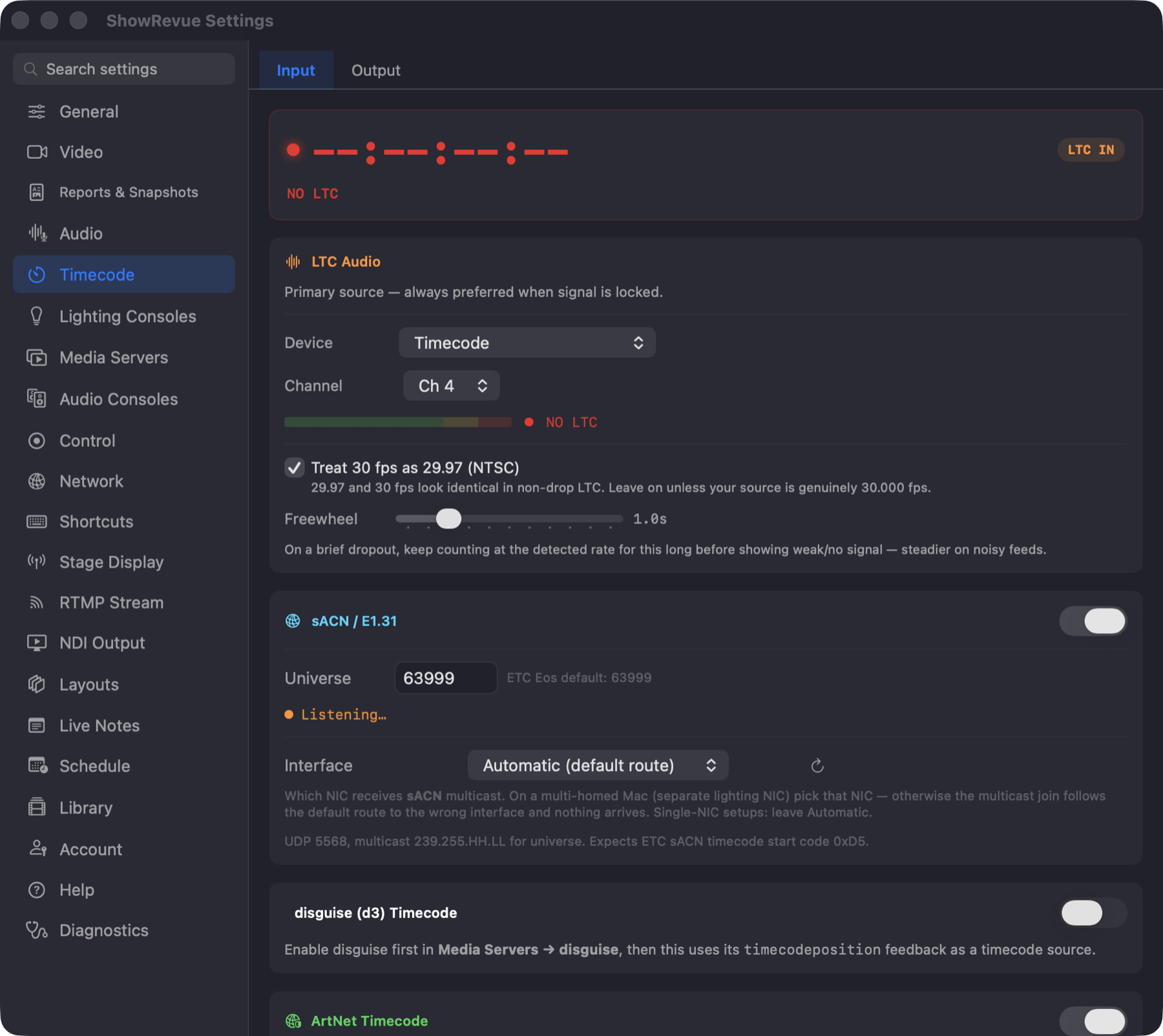
Preferences → Timecode, Input tab: LTC audio source, the network-interface picker for sACN, plus ArtNet, MTC and disguise. The Output tab holds Timecode Output.
All timecode settings live in Preferences → Timecode.
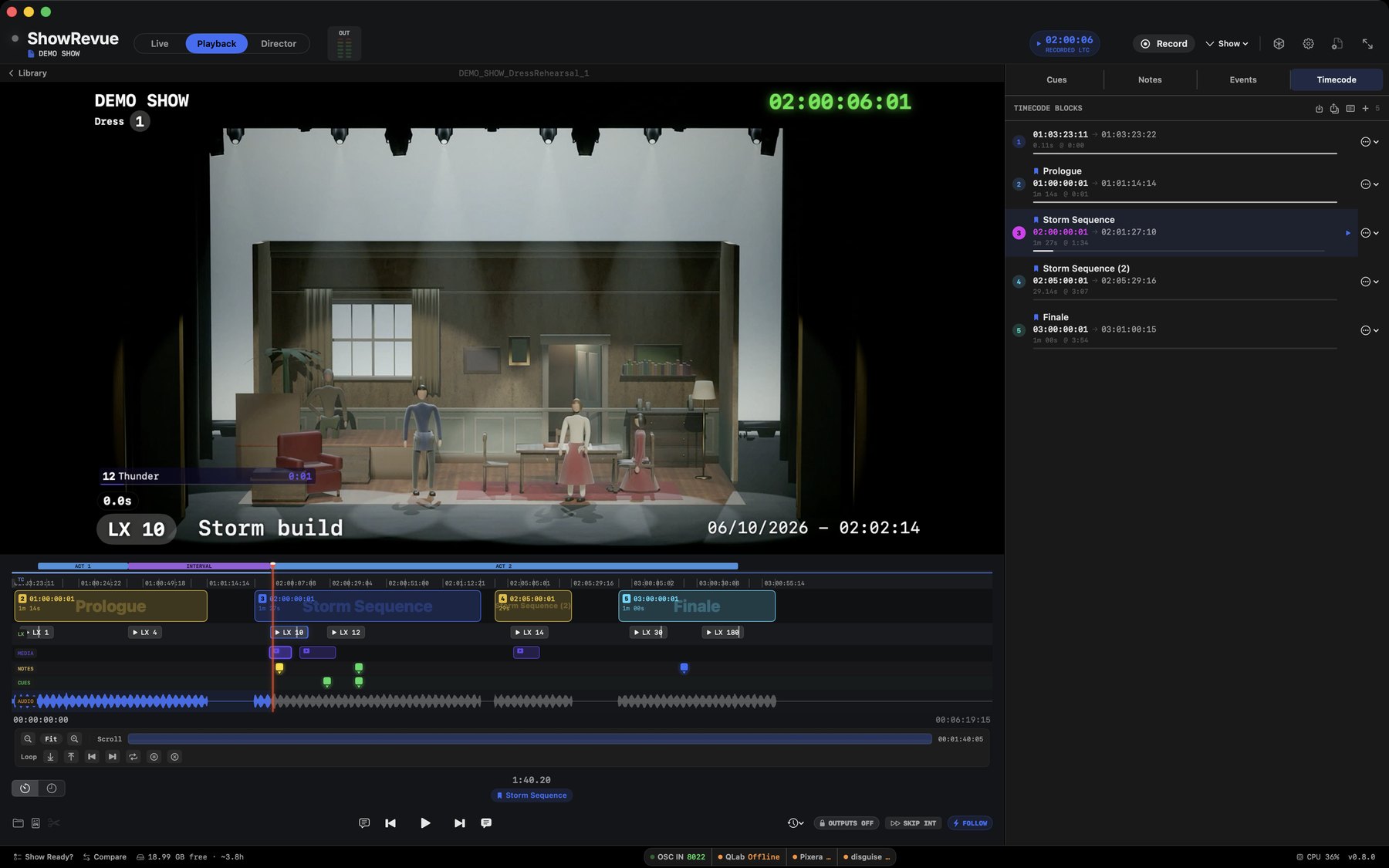
Captured timecode appears as blocks on the playback Timecode tab.
Playback: the LTC readout runs in sync and the timecode block fills as the playhead advances.
Timecode runs in both directions: ShowRevue reads timecode while you record, and can send the recording's timecode back out while you play it back (see Timecode Output below).
For input, ShowRevue reads timecode from five sources. This is the default priority order; you can change it (see Source Priority and failover):
- LTC (audio). First by default. Recorded on its own audio track with the video and decoded during playback. Needs Base or above.
- sACN (ETC timecode). Multicast UDP timecode in ETC's packet format. Needs Professional or above.
- ArtNet Timecode. UDP port 6454, opcode 0x9700. Needs Professional or above.
- MTC (MIDI Timecode). Built from MIDI quarter-frame messages. Needs Professional or above. See MIDI Setup for desks, QLab and network MIDI.
- disguise (d3). The server's
timecodepositionfeedback. Enable disguise under Preferences → Media Servers first. Last by default.
The timecode pill
The pill at the top of the main window shows the state of the LTC input:
| Pill | Colour | Meaning |
|---|---|---|
| LTC LOCKED | Green | Clean frames are decoding. Every frame you record is stamped. |
| LTC WEAK | Gold | Frames stopped decoding for half a second or more. Usually a dropping cable or a low or noisy level. |
| NO LTC | Red | Nothing has decoded for over a second. The readout shows dashes. |
There is no orange state. Get the pill green before you roll: you can't add timecode to a take afterwards, short of Recover Timecode from Audio when the LTC was recorded but not decoded.
Source Priority and failover
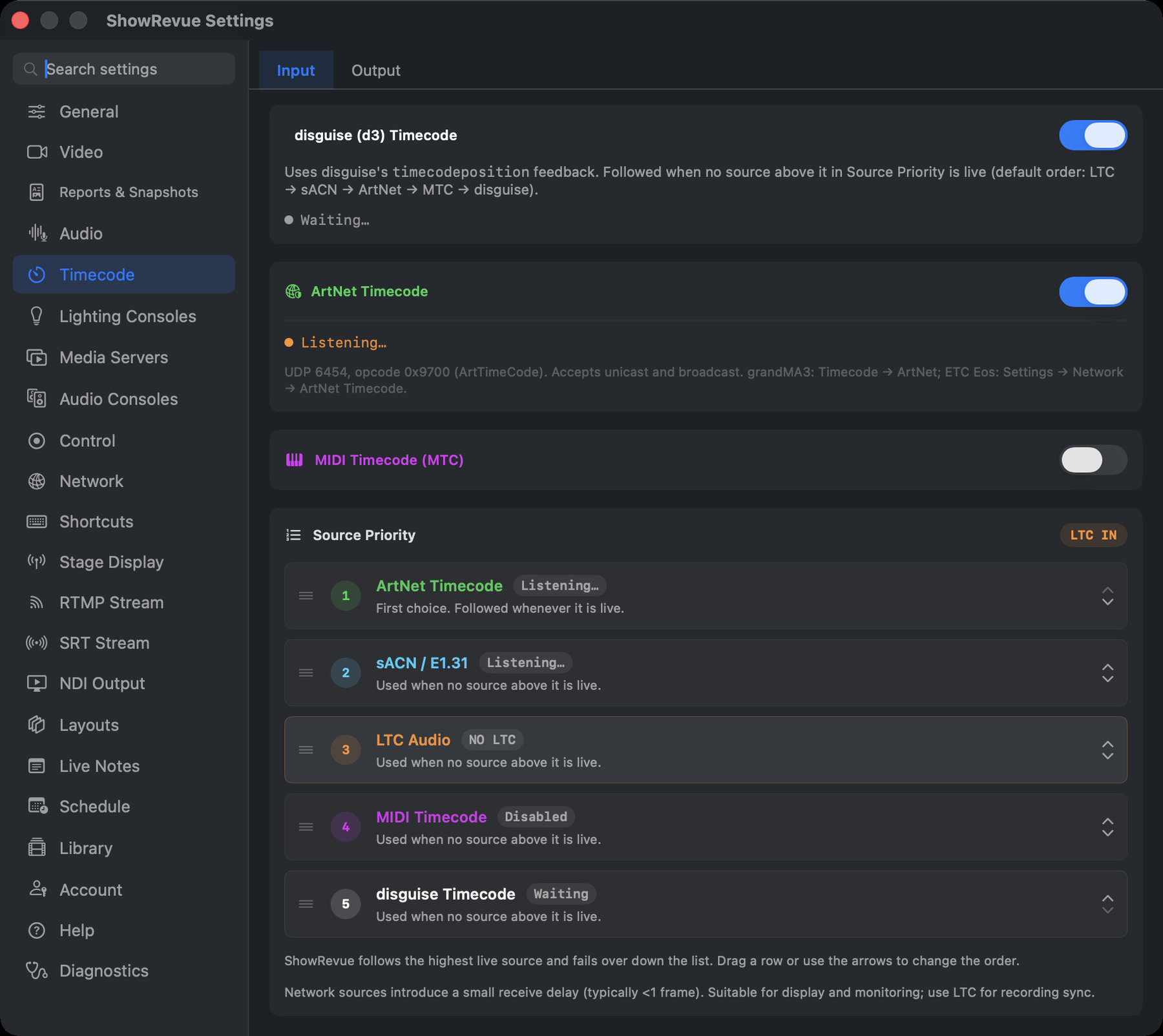
The Source Priority card: grip handles on the left, the order number, each source's live state, and arrows to reorder.
If more than one source is switched on and arriving, the Source Priority card under Preferences → Timecode → Input decides which one ShowRevue follows: the highest source in the list that's live. LTC counts as live when it's locked; the others when they're switched on and receiving. If nothing is live, the readout falls back to LTC and shows its status.
The default order is LTC Audio, sACN, ArtNet Timecode, MIDI Timecode, then disguise. To change it, drag a row by its grip (the three lines on the left) and drop it where you want it, or use the up and down arrows on the right of each row. The order is saved on this Mac and applies straight away. Reordering is locked while recording, by drag and by arrow. Put sACN first, for example, if the lighting desk's timecode is the reference and LTC is only a backup.
Failover is automatic. If the source you're following drops out mid-run (say the LTC cable gets pulled), ShowRevue moves to the next live source in the list and keeps stamping the recording, then goes back as soon as the higher source is live again. The card shows which source it's following and which are on standby, in priority order (for example Following LTC IN · sACN standby), and a source change during a recording is logged with the session.
Network sources add a small receive delay, typically under a frame. They're fine for display and as a backup; use LTC for recording sync where you can.
LTC setup
- Connect the LTC source to an audio interface input.
- Open Preferences → Timecode.
- On the LTC Audio card, choose the audio device.
- Select the correct channel.
- Wait for the pill to turn green (LTC LOCKED).
MTC setup
MTC arrives as MIDI quarter-frame messages. ShowRevue listens on every MIDI source the Mac can see, including network MIDI sessions, so there's no device to pick.
- Open Preferences → Timecode.
- Enable MIDI Timecode (MTC).
- Start timecode at the source. The card shows Receiving once quarter frames arrive.
QLab can't send sACN or Art-Net timecode, so getting QLab's timecode to another Mac over the network means MTC over Apple network MIDI. The full walkthrough, plus MIDI interface advice, is on MIDI Setup.
ArtNet Timecode setup
ArtNet Timecode is a UDP-based protocol broadcast on port 6454. grandMA3 version 2.4 and later can output ArtNet Timecode natively.
- Open Preferences → Timecode.
- Enable ArtNet Timecode.
- The status shows Listening… when waiting, and Receiving (green) with the sender IP once packets arrive.
grandMA3 (v2.4+)
On the MA3 console:
- Go to Setup → Network → Timecode.
- Set Output Protocol to Art-Net Timecode.
- Ensure the console and Mac are on the same subnet (Art-Net uses broadcast).
- Start a timecode session. ShowRevue picks it up automatically.
Make sure the Mac's firewall allows incoming UDP on port 6454.
sACN Timecode setup
Standard sACN (ANSI E1.31) carries DMX levels and has no timecode of its own. The sACN input in
ShowRevue reads ETC's timecode packets (start code 0xD5), sent as multicast UDP. Use it when the
source is an ETC console or another device that sends that format. Most other desks, grandMA3 included,
don't send it, so use LTC, Art-Net timecode or MTC for those.
- Open Preferences → Timecode.
- Enable sACN and set the Universe to match the source.
- The status shows Receiving (green) once timecode packets arrive.
Network Interface (multi-homed Macs)
If the Mac has more than one network interface, for example a rig where the lighting network is on a separate adapter from the internet/Wi-Fi, choose the right one under Preferences → Timecode → Network Interface.
sACN's multicast join would otherwise follow the system default route and land on the wrong interface, so no timecode arrives. Pick the interface on the lighting network. On a single-interface Mac, leave it on Automatic.
This only affects sACN (multicast). Art-Net is broadcast and arrives on any interface.
Timecode Output
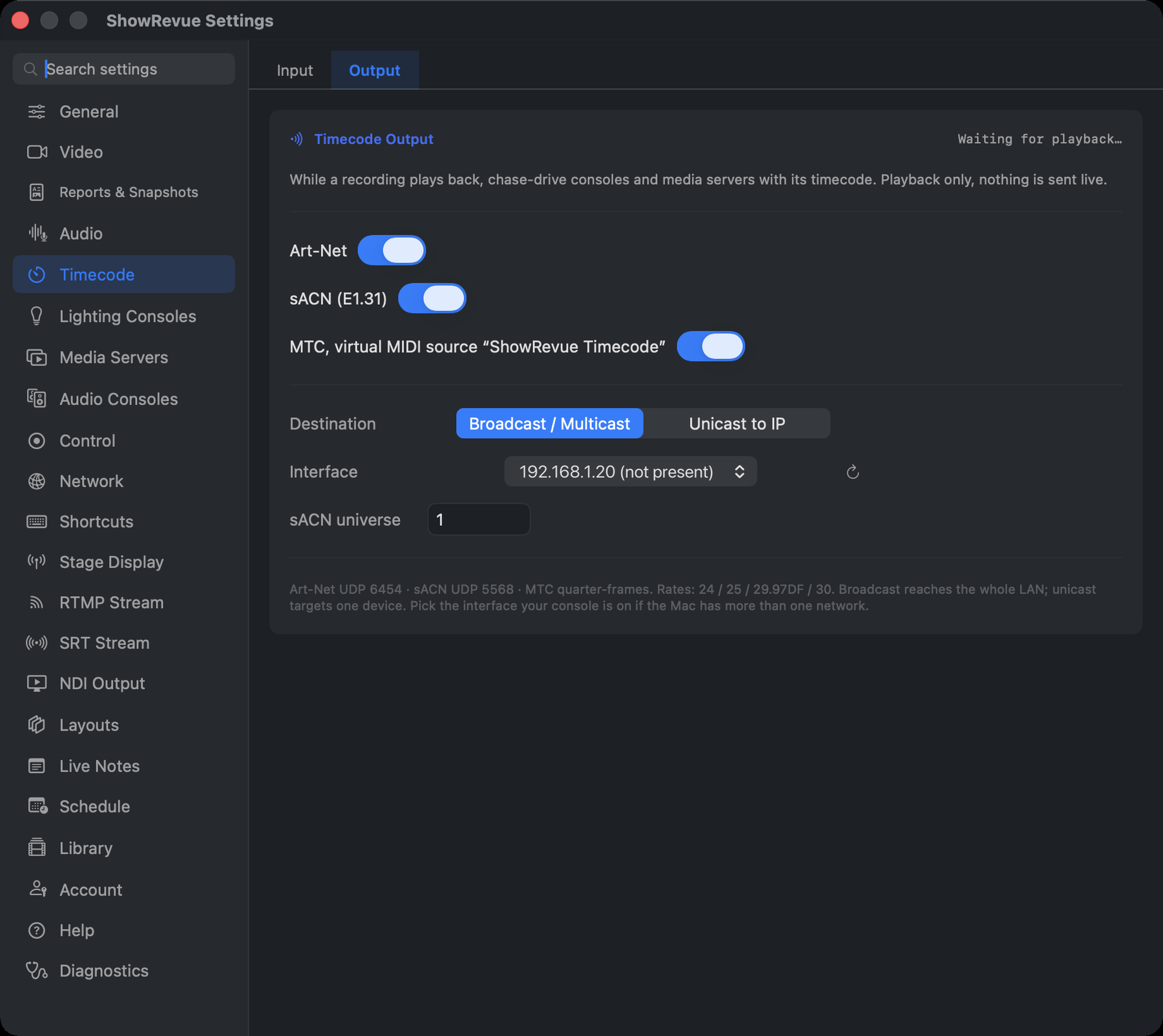
While a recording plays back, ShowRevue can send its timecode so a console or media server chases the rehearsal. Replay last night's run and the rig follows it. Playback only: nothing is ever sent while you're live or recording. Three protocols, each with its own toggle, usable in any combination: Art-Net (UDP 6454), sACN in ETC's timecode format (UDP 5568) and MTC (a virtual MIDI source named ShowRevue Timecode), with broadcast or unicast destinations and an interface picker for multi-homed rigs. LTC goes back out too: the recorded LTC track plays through whichever audio output you route it to.
Enable it under Preferences → Timecode → Output. The full walkthrough is on the Timecode Output page.
Named timecode sections
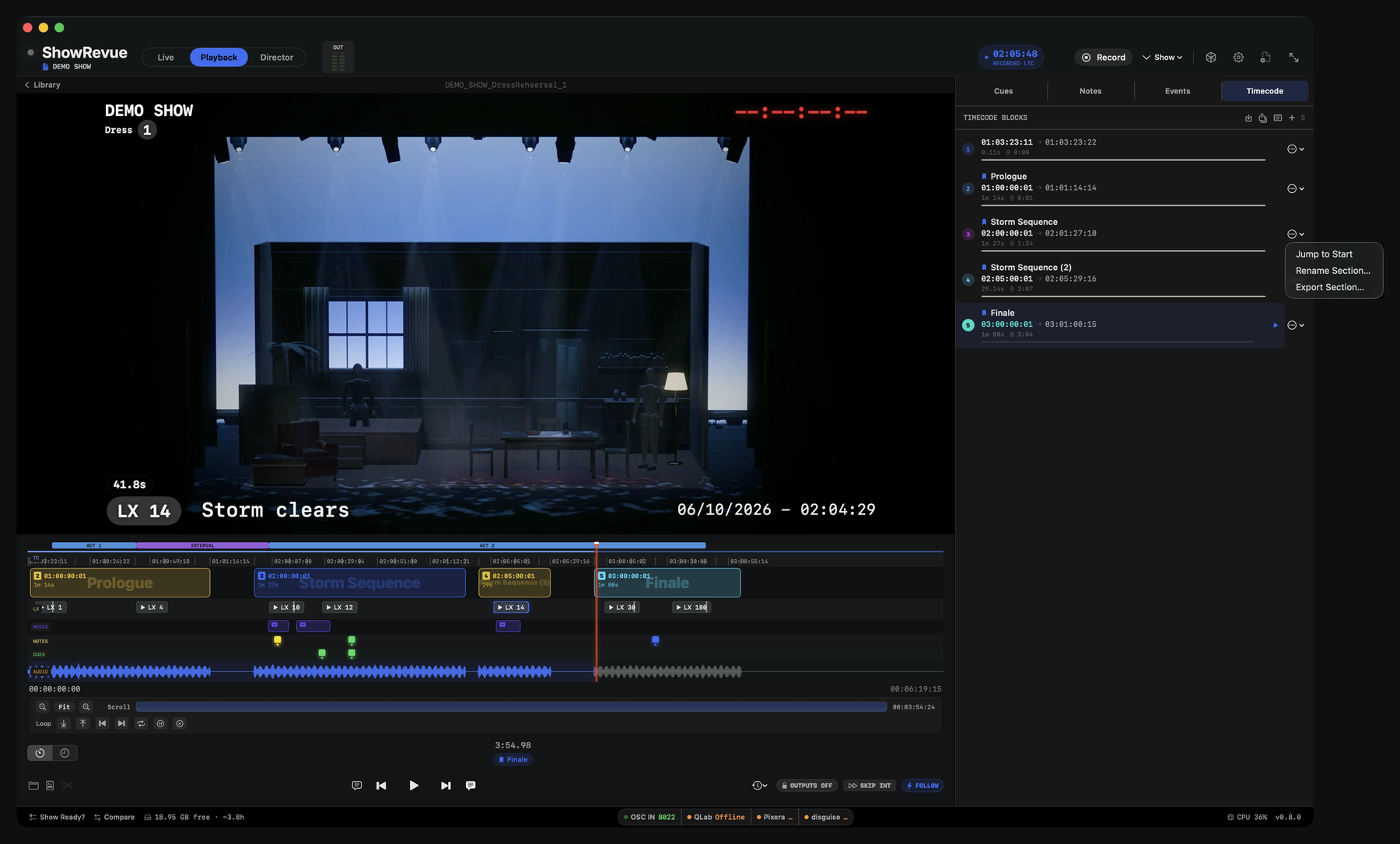
The Timecode panel with the + button in the header. A block that is already named shows Jump to Start, Rename Section… and Export Section… in its menu; an unnamed block offers Name as Section… instead.
Name spans of LTC so a stretch of timecode reads as "Act 1" or "Storm Sequence" instead of a
bare 01:04:30. Sections live on the playback viewer's Timecode panel:
- Use the
+button to add a section, or a block's "Name as Section…" item. - Import a CSV of
start,end,namerows to name many spans at once. - In the Library's Timecode view (Open a Recording → Timecode), double-click a section's heading to name it.
Naming sections needs Base or above.
A section is anchored by its LTC range, not by run-time, so it doesn't care which take it's in.
Sections save to the .srshow project (TimecodeSection) and to each recording's sidecar, so
the name re-attaches to every future performance of the show.
Wherever the live LTC sits inside a section, that section shows as a pill:
- on the player's bottom row,
- on the scrubber block tile,
- on the Director timebar, and
- on the companion app (pushed in the LAN + cloud state as
currentSection).
Exporting sections
Named sections can be batch exported as individual clips, each carrying its own timecode (programme audio left, LTC right) ready to import into a timecode-chasing tool such as Cuepoints. The same panel also writes a timecode report listing every section with its range, duration and the LX cues inside it.
Full walkthrough: Timecode Sections and Batch Export.
Show-level cuepoints
Timecoded cuepoints (the callable show beats you place in the Cuepoints lane on the player's Cues tab) are show-level: one set carried across every recording of the show, keyed to timecode. Placed inside a named section they chase the live LTC; outside one they pin to the recording's run-time. They feed NOW / NEXT and the standby → GO countdown in Director View.
Drop-frame timecode
ShowRevue counts 29.97 and 59.94 drop-frame timecode correctly end to end. Frame arithmetic skips the frame numbers that don't exist in drop-frame, so a freewheeled or reconstructed readout never drifts against the source (a plain 30 fps count would gain about 2 frames a minute).
Each recording stores the real timecode rate and drop-frame flag in its cue sidecar at record time, taken from the timecode that actually locked the take. Playback, the timecode readout, and Timecode Output all follow that stored rate. A 29.97DF recording plays back and chases as 29.97DF, whatever your preferences say today.
Drop-frame timecode displays with the SMPTE semicolon separator before the frames field. 01:00:00;12, so you can tell at a glance which counting mode a recording uses.